Is your standing desk showing an error message, and are you bothered? What does ASR mean on my standing desk? Then this guide is for you.
Standing desks are incredible inventions that help us work better. Sometimes, they show strange codes like ASR. Let’s find out in easy words and make sure your desk works just right.
ASR stands for All System Reset. It usually occurs when movement is blocked, or the desk’s collision system activates. Make sure that the desk can move freely.
What does ASR mean on my standing desk? This detailed overview explores the All System Reset (ASR) error, its causes, significance, and solutions to ensure your standing desk operates smoothly and efficiently.
What is ASR ?

ASR, short for All System Reset, is an integral feature embedded within the control systems of contemporary standing desks. Its fundamental purpose is to act as a fail-safe mechanism, ensuring the stability and efficiency of these ergonomic workstations. This feature functions by comprehensively resetting the desk’s control system. Specific triggers or errors are detected.
ASR’s functionality is to recalibrate the desk’s position and mechanisms. This recalibration ensures that the desk can adjust its height according to user preferences, facilitating seamless transitions between sitting and standing positions.
Moreover, ASR is programmed to identify and address any operational irregularities that may compromise the desk’s functionality. For desks obstructed by physical obstacles that impede movement or cause position detection issues, ASR is a proactive measure to rectify such problems promptly.
The importance of ASR for the proper functioning of standing desks cannot be overstated. Without this safeguard mechanism, standing desks would be susceptible to various issues that could hinder their performance and compromise user experience.
For instance, without ASR, the desk may struggle to detect its position accurately, leading to inconsistencies in height adjustments and potential collisions with objects in its vicinity.
By implementing ASR, manufacturers ensure that standing desks maintain optimal functionality and user safety under various operating conditions.
Beyond its role in ensuring proper functionality, ASR also plays a critical role in maintaining standing desks’ safety, stability, and longevity.
From a safety perspective, ASR helps prevent accidents or injuries by addressing potential issues before they escalate.ASR recalibrates the desk’s position to minimize the risk of sudden movements or instability during height adjustments, making it safer for the user.
Additionally, by proactively identifying and rectifying operational irregularities, ASR contributes to the stability of standing desks, reducing the likelihood of wobbling or instability during use.
Moreover, ASR significantly impacts the longevity of standing desks by minimizing wear and tear on essential components. By promptly addressing issues such as mechanical strain or misalignment, ASR helps extend the lifespan of standing desks, ensuring their continued reliability and performance over time.
Ultimately, ASR is a cornerstone of modern standing desk design, providing users with a reliable and efficient workspace solution that prioritizes safety, stability, and longevity.
Causes of ASR Errors
ASR errors can arise from various triggers, potentially disrupting the seamless operation of standing desks. The most common causes are physical obstructions within the desk’s movement path and activating the anti-collision system, designed to prevent collisions with objects or individuals.
Physical obstructions, such as clutter or objects inadvertently placed beneath or around the desk, can impede movement. When the desk attempts to adjust its height in the presence of such obstructions, it may encounter resistance, triggering an ASR error.
Additionally, activating the anti-collision system, typically in response to detecting an object in its path, can lead to ASR errors. While the system is designed to prevent collisions and ensure user safety, its activation may disrupt the desk’s position mechanisms, necessitating a reset.
These factors can contribute to inaccuracies in the desk’s position, compromising its ability to adjust height accurately. When faced with obstructions or anti-collision system activation, the desk may struggle to determine its precise position, leading to inconsistencies in height adjustments.
As a result, users may experience delays or irregularities in transitioning between sitting and standing positions, detracting from the overall functionality and user experience of the desk.
Illustratively, scenarios where ASR errors may occur during regular desk usage abound. For instance, imagine a busy workspace cluttered with documents, equipment, or personal belongings. During a hectic workday, a user attempts to adjust their standing desk to accommodate a change in posture. Unbeknownst to them, a stack of papers inadvertently placed beneath the desk obstructs its movement.
As the desk encounters resistance while adjusting its height, it triggers an ASR error, prompting the user to address the issue and initiate a reset.
Similarly, consider a scenario where the anti-collision system is activated due to the sudden presence of a colleague or object near the desk.
While the system effectively prevents a potential collision, its activation may disrupt the desk’s position detectdesk’sesulting in an ASR error. In both instances, these common triggers for ASR errors highlight the importance of maintaining a clear workspace and ensuring proper functioning of the desk’s safety features, which minimize disruptions and enhance user experience.
Understanding ASR Error Messages

When an ASR error occurs, it is often communicated to users through error messages displayed on the desk’s digital panel. Desk’s messages indicate underlying issues that require attention and resolution. Understanding these error messages is crucial for users to troubleshoot and address ASR errors effectively.
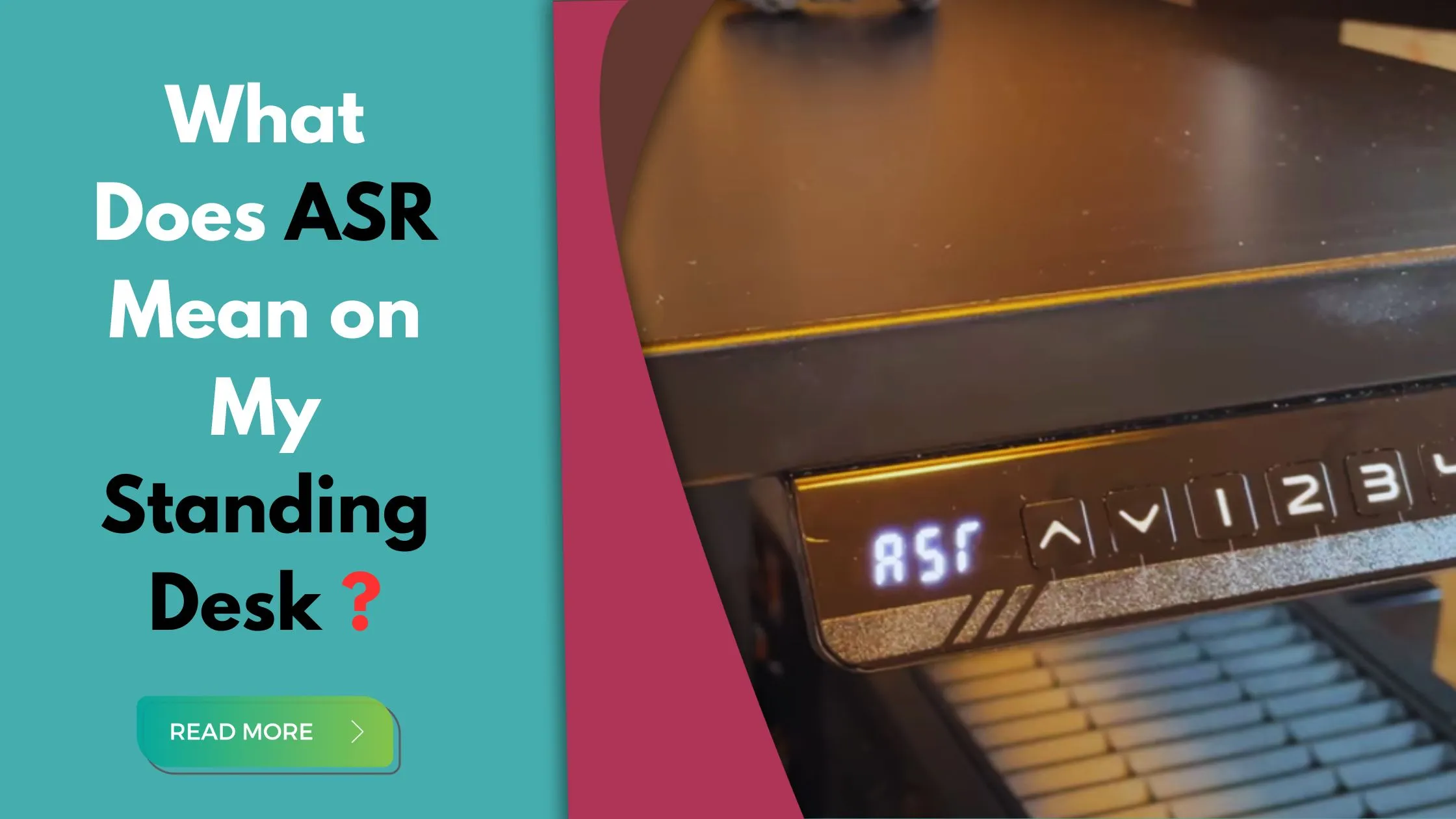
Understanding ASR error messages involves interpreting the specific code or notification displayed on the desk’s digital panel. The code typically indicates the nature of the error encountered, such as “ASR” or “All System Reset.” The message may contain further details or instructions, like prompts to initiate a reset or clear obstructions.
Accurate error diagnosis is essential for effective troubleshooting, as it enables users to identify the root cause of the issue and implement appropriate solutions.
By understanding the specific error message displayed, users can take targeted actions to address the underlying problem, whether it involves clearing obstructions, recalibrating the desk’s position mechanisms, or seeking technical assistance.
Addressing ASR errors promptly is paramount to preventing potential damage or malfunctions. Ignoring or delaying the resolution of ASR errors can exacerbate underlying issues, leading to further complications and potentially compromising the functionality and safety of the standing desk.
By promptly addressing ASR errors, users can mitigate the risk of damage to the desk’s components, ensure optimum performance, and maintain a safe and comfortable working environment.
Understanding ASR error messages enables users to accurately diagnose issues, implement effective troubleshooting measures, and prevent potential damage or malfunctions. Promptly addressing ASR errors is essential for maintaining standing desks’ functionality, safety, and longevity, ensuring a seamless and productive work experience.
Easy Fix for Standing Desk ASR Error | Step-by-Step
Standing desks have become commonplace in workspaces globally, offering respite from prolonged sitting hours. ASR, or anti-collapse stability range, signals that your electric standing desk needs a reset. It’s a safety feature. It’s causing damage, especially when loaded with valuable equipment. To address the error:
- Clear the area under your desk to ensure unimpeded movement.
- Locate the down button on the control panel and hold it until “rest” displays, indicating” a reset.
- Release the button, allowing the desk to reset and clear the ASR error.
If the error persists, consider briefly unplugging the desk. This troubleshooting ensures the desk’s stability, which is crucial in the digital age where minor glitches can disrupt workflow.
Promptly addressing ASR errors safeguards your desk’s functionality and ensures uninterrupted productivity.
Preventative Measures and Maintenance
Regular desk maintenance is critical to preventing ASR errors. Periodically clear the clutter around and underneath the desk to ensure the movement path is free of obstructions.
Avoid overloading the desk with excessive weight, as this can strain its mechanisms and increase the likelihood of errors. Additionally, consider adjusting the desk’s height settings daily to reduce stress on its components.
Taking proactive measures is essential for ensuring standing desks‘ optimal performance and longevity. By implementing preventive maintenance practices, users can minimize the risk of ASR errors and prolong the lifespan of their desks.
Regular inspections and maintenance checks can help identify potential issues early on, allowing for timely repairs or adjustments.
Incorporating ASR error troubleshooting into routine desk maintenance practices is advisable. Familiarize yourself with the desk’s control panel and messages to identify and address ASR errors as they arise quickly. Include ASR error resolution as part of your regular desk maintenance checklist to ensure prompt attention to detected issues.
Final Verdict
Now you understand what does asr mean on my standing desk? ASR plays a vital role in maintaining the functionality and safety of standing desks.
By promptly addressing ASR errors, users can ensure uninterrupted productivity and prevent potential damage or malfunctions. Users must stay informed and proactive in troubleshooting ASR errors to maximize the benefits of their standing desks.
Through preventive maintenance and proactive troubleshooting, users can optimize the performance and longevity of their desks, creating a comfortable and efficient workspace environment.
FAQs
1: Why does my standing desk say RSt?
2: How do you adjust a standing desk?
Ensure that it is set to the height of your elbows.
Bend your elbows at a 90-degree angle, keeping your neck neutral and your wrists straight in front of you.
Lift or lower the standing desk until your forearms parallel the desk surface.
3: What is the ASR code on a Mojo desk?
4: How do I fix the ASR code on my standing desk?
Hold the DOWN button for approximately 3 seconds.
Release the DOWN button.
The electric desk will automatically lower itself and return to its average height.
The ASR error should disappear from the LED panel display.